By Ellard Thomas, MBA · Smarter Business Growth
Quick answer: To get more Google reviews, finish your Google Business Profile, copy your review link, and send it to every customer the same day you finish their job with a short, personal ask. Then reply to every review. Most businesses don’t have a review problem; they have an asking problem.
Why do Google reviews matter so much?
Picture two listings side by side. One has 4 reviews, and the newest is from last year. The other has 120, and three came in this week. Which one are you calling? Your customers do that math in about two seconds.
Reviews tell a stranger that real people trust you, and they are one of the signals Google uses to decide which local businesses to show. Google’s own guidance on tips to get more reviews says high-quality, positive reviews can improve your business’s visibility. More good reviews means you show up more and get picked more.
The 5-step review system
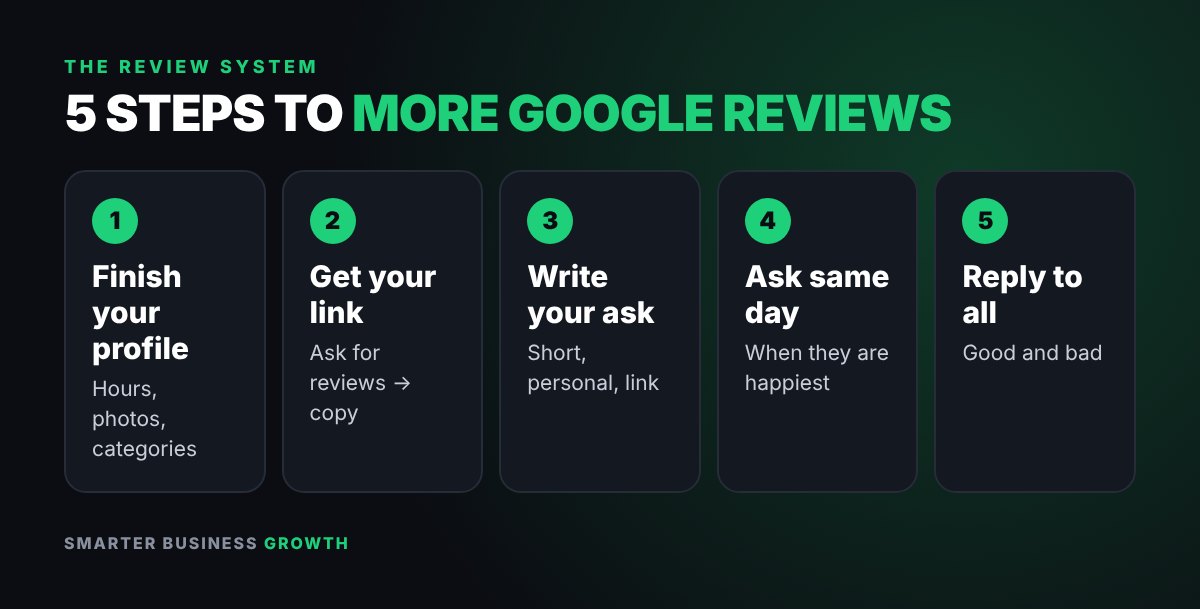
- Finish your Google Business Profile
- Get your review link
- Write your ask
- Ask at the right moment
- Reply to every review
Step 1: Finish your Google Business Profile
Search your business name on Google while you are logged in and choose the edit option, or manage it at Google Business Profile. Fill in your name, hours, phone number, website, service area and categories, and add a few real photos of your work, team or location. People who tap your review link land right there, and a complete profile looks trustworthy.
Step 2: Get your Google review link
On your Business Profile, look for Ask for reviews or Get more reviews. It gives you a short link that takes a customer straight to the box where they leave stars and a comment, with no searching. Save it somewhere you can reach in two taps, like a note on your phone or a text shortcut.
Turn that link into a QR code too (many free tools do this) so you can print it on receipts, invoices, business cards or a small sign at your counter.
Step 3: Copy these review request templates
Text message:
Hi, it’s [your name] from [your business]. Thank you so much for choosing us! If you were happy with how everything went, would you mind leaving a quick Google review? It really helps a small business like ours. Here’s the link: [your review link]
Email:
Subject: Quick favor?
Hi [first name], thanks again for trusting us with [job or order]. If you have 30 seconds, a Google review would mean a lot and helps other customers find us: [your review link]. Thank you! [Your name]
Keep it short, make it personal and always include the link. Every extra step is a reason someone won’t finish.
Step 4: Ask at the right moment
The best time to ask is when the customer is happiest: right after the job is done, the order arrives or they say thanks. Wait two weeks and the good feeling has faded. Build the ask into how every job closes: finish the work, say thank you and send the text the same day.
Good places to ask:
- In person at checkout, then send the link by text
- In your “job complete” or delivery confirmation message
- On printed receipts and invoices with a QR code
- In a follow-up email a day after service
- In your email signature
Step 5: Reply to every review
Thank happy customers by name and mention something specific. It shows the next reader that a real person runs the business.
Positive review reply: Thanks so much, Maria! We loved working on your kitchen, and we’re glad the new cabinets turned out exactly how you pictured them.
For a negative review, stay calm. Thank them for the feedback, apologize that their experience wasn’t what they expected and offer to make it right offline. Future customers read how you handled it, not just the complaint.
Negative review reply: Thank you for letting us know, James. I’m sorry your delivery arrived late. That’s not the experience we want for anyone. Please call me directly at [phone] so I can make this right.
What not to do (it can get reviews removed)
- Don’t pay for reviews or offer discounts or gifts in exchange for them.
- Don’t write reviews for yourself or have friends, family or staff post fake ones.
- Don’t ask only the customers you think are happy. Ask everyone the same way.
- Don’t offer anything in exchange for changing or removing a negative review.
These practices break Google’s prohibited and restricted content policy and can get reviews removed or your profile restricted. Honest reviews, even a few imperfect ones, look more believable than a wall of perfect fives.
Your 7-day plan to get more Google reviews

| Day | What to do |
|---|---|
| Day 1 | Finish your profile and grab your review link |
| Day 2 | Write your ask text and save it as a shortcut; make a QR code |
| Days 3–7 | Send it to every customer you finish work for, plus five past customers you know were happy |
| Every evening | Take two minutes to reply to new reviews |
By the end of the week it’s a habit, and reviews keep coming as long as you keep asking.
Track it so it sticks
Once a week, write down your total review count and average rating. Set a simple goal, like two new reviews a week. When the number stalls, it almost always means the asking stopped, not that customers stopped being happy.
What to do when customers say “I’ll do it later”
Most people mean it and then forget. A gentle follow-up two or three days later doubles your chances without being pushy. Keep it light: “Hi [name], just a friendly reminder in case you have a moment for that review. Here’s the link again: [link]. Thanks either way!” Send one reminder only, then let it go.
Want more simple growth systems?
Grab the free Funding Playbook for small business owners and get practical tips straight to your inbox.
Frequently asked questions
How many Google reviews does a small business need?
There is no magic number. What matters most is having more recent, genuine reviews than the businesses you compete with in your area, and getting new ones steadily.
Can I ask customers for Google reviews?
Yes. Asking is allowed and encouraged. What Google does not allow is paying for reviews, offering rewards for them or posting fake ones.
Should I respond to old reviews?
Yes. Replying to older reviews still shows future customers that you care, and it is a quick win when you are getting started.
Can I remove a bad Google review?
You can’t delete a review just because it’s negative. If a review breaks Google’s policies, such as spam, fake content or hate speech, you can report it from your Business Profile. Otherwise, a calm, helpful reply is your best move.
Do Google reviews help my local search ranking?
Reviews are one of several factors Google considers for local results, along with how relevant, close and well-known your business is. A complete profile plus steady, genuine reviews gives you the best shot at showing up when nearby customers search.
Want more quick wins? Follow Smarter Business Growth on YouTube, Instagram, TikTok and Pinterest for daily tips.
Educational content only. Results vary by business. Smarter Business Growth is not affiliated with Google.

ABOUT THE AUTHOR
Ellard Thomas, MBA
Ellard is the founder of Smarter Business Growth and a business consultant with 20 years of experience helping small business owners grow, from getting customers to understanding funding.
Watch Smarter Business Growth on YouTube · Follow @smarterbusinessgrowth on Instagram


Leave a Reply